AI should not replace QA clicks. It should learn to find trouble.
AI summary
- The first useful role for AI in QA is not writing scripts. It is surfacing the risks hidden inside a requirement: boundaries, permissions, idempotency, partial failure, audit logs, notifications, and rollback.
- The real testing asset is not a pile of steps. It is the traceable chain between requirements, test points, test cases, automation, execution evidence, defects, and regression scope.
- AI can draft test cases, test data, and automation code, but QA, product, and engineering still have to own the oracle: what exactly counts as correct.
- In system and E2E testing, AI is most useful when it translates manual flows into maintainable scripts, summarizes failed-test evidence, and recommends what to rerun after a change.
- The practical path is to attach AI to the tools a team already uses: Jira, a test case system, Playwright or API tests, CI, logs, traces, and the issue tracker. Do not create another disconnected chat box.
It is 6 pm on Friday. A product manager changes one line in the requirement from "support refunds" to "support batch refunds."
Engineering sees an API that now accepts an array. Product sees fewer clicks for the user. Management sees an experience improvement.
QA sees a different list.
What happens if 3 out of 100 refunds fail? Can a double click refund the same order twice? Does the user get one notification or one per order? Is the audit log recorded at the batch level or per item? Does the requester need permission for every order in the batch? If the payment provider times out, does the system retry, suspend, or roll back?
Those questions are worth more than "generate 20 test cases for me."
The first valuable use of AI in testing is not to click buttons for QA, and not to write unit tests for engineers. It is to become a tireless colleague who asks what might go wrong. It reads the requirement, the API draft, the bug history, and the recent changes, then lays out the gaps that humans often miss and production often exposes.
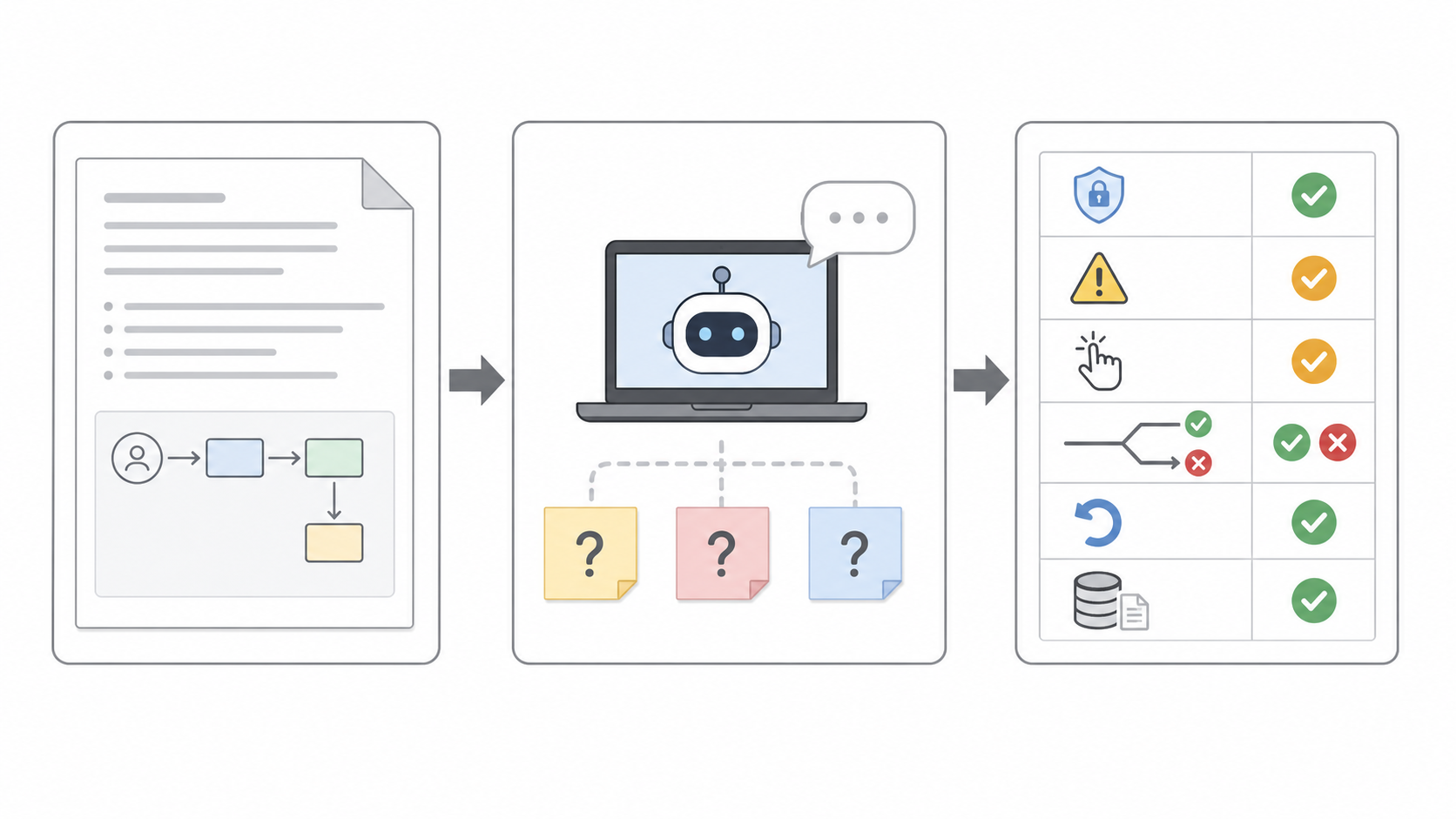
Do not start with test generation
When teams first talk about AI in testing, they often jump to the most tempting question:
Can AI generate test cases automatically?
Yes. But as a starting point, that question is too small and too dangerous.
It is too small because QA is not only test case writing. Requirement review, risk analysis, test design, data preparation, environment setup, script maintenance, failure triage, regression selection, and release signoff are all part of the testing workflow. If the only goal is "generate cases," AI becomes a faster document assistant.
It is too dangerous because more test cases do not automatically mean better quality. A model can easily produce a dozen polished cases with clean steps and nice formatting, while still missing the risk that will actually break in production. Worse, those cases can give the team the feeling that something has been covered when it has merely been described.
The hard part of testing is not writing more steps. It is answering three questions:
Where is this change actually risky?
What result counts as correct?
When something fails, how do we know whose problem it is?
So the practical starting point is to lower the ambition.
Do not ask AI to be the testing expert first. Ask it to be the colleague who finds trouble.
Step one: turn requirements into test points
When QA receives a requirement, the most valuable first move is not writing cases. It is decomposing the requirement into test points.
A useful AI-assisted process should not start with a single prompt like "write test cases for this." The model should see several kinds of context:
Product requirements, user stories, and acceptance criteria.
API documents, state machines, and permission rules.
Past defects, production incidents, and support feedback.
Similar features that caused trouble in recent releases.
The first output should not be a finished test case set. It should be a test-point matrix.
For batch refunds, it might start with something like this:
| Dimension | Question AI should raise | Output |
|---|---|---|
| Boundary | What happens with 0, 1, 100, or more-than-limit items? | Boundary test points |
| Idempotency | What if the user resubmits, the browser retries, or the gateway replays? | Idempotency test points |
| Partial failure | If 3 out of 100 items fail, how are page state, notifications, and accounting shown? | Exception paths |
| Permission | Does the requester have permission for every order in the batch? | Permission test points |
| Audit | How is responsibility recorded for the batch and for each item? | Audit test points |
| Recovery | Can the system recover cleanly after a provider timeout? | Recovery test points |
This is a way to unpack QA experience.
A senior QA engineer often runs this checklist mentally. A junior person may not. AI is useful when it makes that trouble-finding routine visible and repeatable for every requirement.
This is not just an internet-product trick. In an ACL Industry 2025 paper, Bosch researchers looked at how to generate test specifications from system-level requirements in domains such as automotive software. Their workflow turns natural-language requirements into test purposes, then into test scenarios and test specifications. In a user study, they reported a 30% to 40% reduction in test development effort.
The important part is where AI sits. It is not only at the end, writing scripts. It is earlier in the workflow, helping transform requirements into testable structure. For QA, that step often matters before automation code exists.
Step two: QA must own the oracle
The most important part of a test case is not the action. It is the expected result.
This is easy to underestimate.
"Click batch refund, select three orders, click confirm" is only movement. The testing value lives in the second half: what order states should become, when balances should change, whether failed items can be retried, what the user should see, and how audit logs should be written.
Those expected results cannot be left entirely to the model.
AI can draft candidate oracles. For example:
If a batch partially succeeds, successful orders move to refunded, failed orders keep their previous state, and each failed item displays a reason.
If the same refund request is submitted twice, it takes effect only once.
If the user lacks permission, the system blocks before execution instead of partially processing some orders.
But whether the product should behave that way is a business rule. Product, engineering, and QA have to confirm it.
So the workflow should be clear: AI drafts candidate cases; QA reviews test intent.
That is why "AI writes tests" is a misleading phrase. It makes testing sound like document generation. A mature process splits the work differently:
AI expands possibilities.
QA confirms risk and expected behavior.
The automation framework executes deterministically.
CI keeps providing feedback.
With that split, AI helps without taking authority it should not have.
Step three: manual flows can become automation
In system testing and E2E testing, many teams know what to test. The hard part is turning that knowledge into reliable automation.
QA may already know that the critical path is "user opens product page, checks out, pays, requests a refund, receives notification." But turning that path into a stable Playwright, Cypress, or Selenium script means finding selectors, handling waits, preparing data, cleaning state, and connecting the result to CI. The business changes slightly, and the script needs work again.
This is a good place for AI.
Do not make QA describe everything in natural language to a chat box. A better workflow is to let QA use the product normally in a browser and record the flow. Then AI and the testing framework translate that operation into a script draft, and adapt it to the repository's page objects, helpers, fixtures, and data conventions.
That is much more grounded than asking, "write a test from login to refund."
The real interaction carries context: what the page looks like, where the button is, which requests fire, which states change, and how existing tests in the project are written.
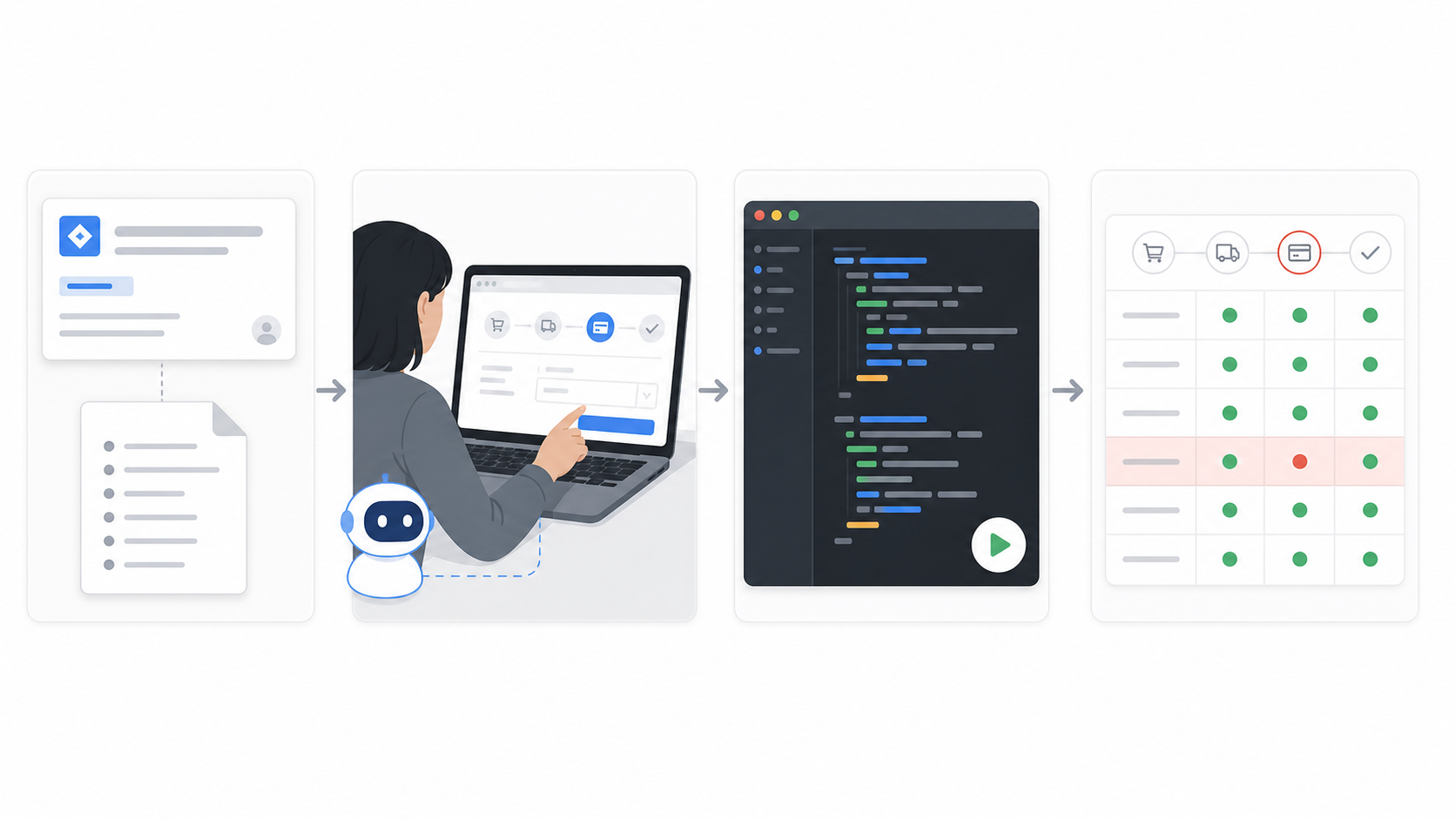
Microsoft's Power Platform Playwright sample follows this kind of grounded path: record a manual flow with Playwright codegen, use Copilot to refactor the generated test according to project conventions, then have a human review it. The process is modest, which is exactly why it looks adoptable.
The same anxiety shows up in engineering communities. On Hacker News, one person asked why AI coding so often feels like "requirements -> code -> fix when broken" instead of "requirements -> tests -> code -> run tests." Others are experimenting with recording manual QA flows and turning them into E2E test code. The shared concern is simple: AI is making code generation faster, but E2E coverage is not accelerating at the same pace.
That is QA's opening.
When code production speeds up, testing does not become less important. It becomes the bottleneck. If AI only helps developers produce more code, it amplifies that bottleneck. If AI helps QA turn manual flows into runnable, maintainable, regression-ready test assets, then it changes the software delivery system.
Step four: after failure, let AI read the scene
The worst part of a failed test is not that it turned red.
It is not knowing why it turned red.
Is there a real product bug? Is the API environment down? Did someone dirty the test data? Is the script waiting too little? Did copy change while behavior stayed correct? Did the latest pull request break the flow? Is a third-party service flaky?
This is not a good place to make AI the judge. It is a good place to make AI the person who organizes the scene.
It can look at evidence that is usually scattered:
Test steps.
Browser screenshots and traces.
Console logs.
Network requests and responses.
Backend logs.
Recent code diffs.
Test data state.
Then it can produce a triage draft: this looks more like a product bug, an outdated script, an environment problem, a data problem, or an upstream dependency issue.
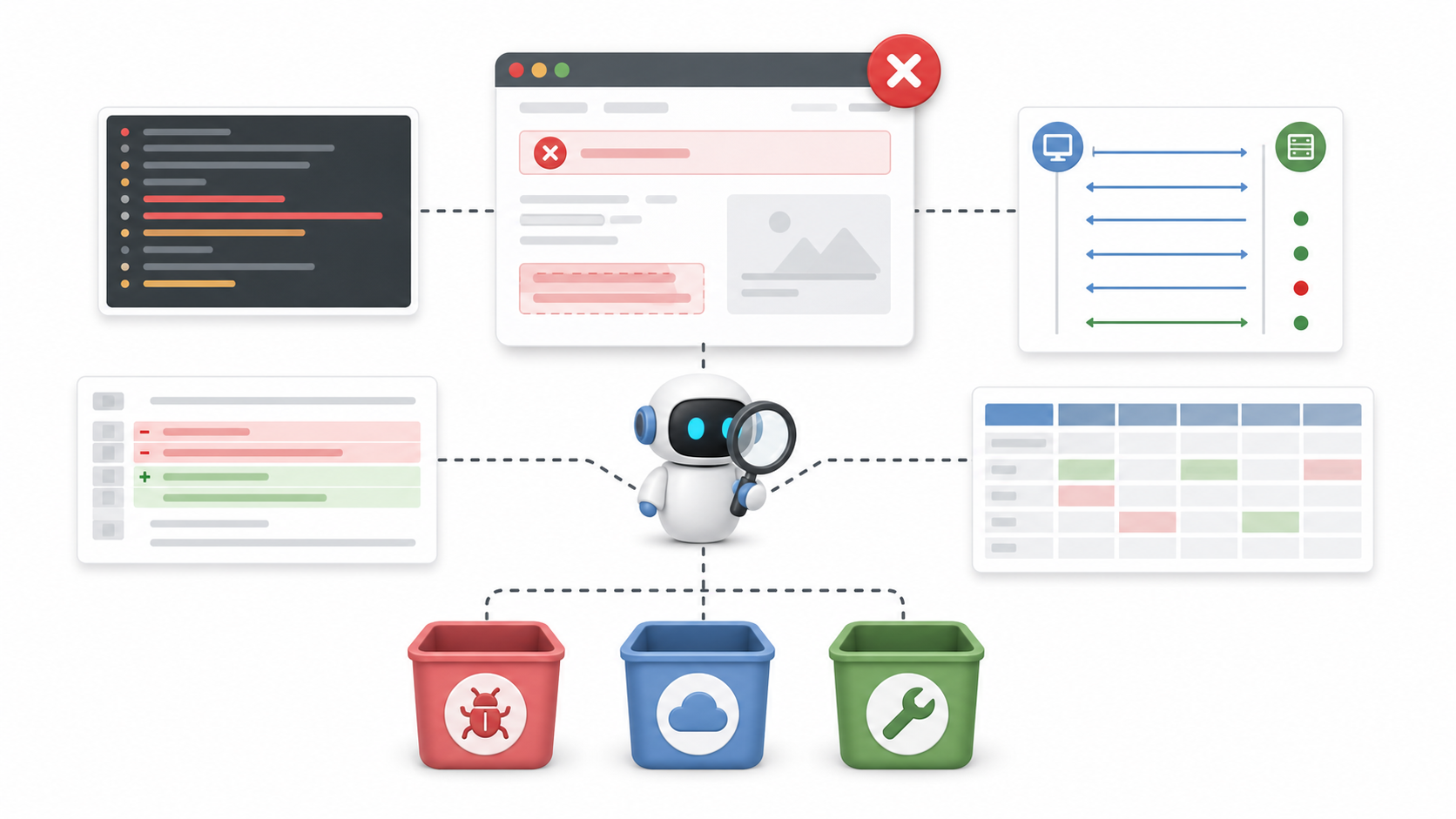
Google is already putting AI in this part of the workflow. A 2026 paper describes an internal system for diagnosing integration test failures. It does not replace the test framework's pass/fail decision. It reads failure logs and related context, writes a root-cause summary, and points to key log lines. The research team manually evaluated 71 real failures and reported 90.14% root-cause diagnosis accuracy. After deployment, the system covered 52,635 failed tests.
That is a more reliable shape than asking AI to decide whether a test passed.
Pass and fail should come from the test framework. AI should read the failed scene and help people know where to look next.
That matches real QA work. QA often does more than find the issue. QA decides who owns it, whether it blocks release, whether to roll back, whether a degraded launch is acceptable, and whether a regression case should be added. If AI prepares the evidence, that human judgment gets faster.
Step five: regression is not "run everything"
In many teams, regression testing looks like a process problem. Underneath, it is a selection problem.
There is never enough time. Environments are constrained. Test data is messy. The release window is closing.
So the hard question is not "can we generate more tests?"
It is:
Which tests matter most for this change?
Which cases require manual confirmation?
Which automated cases already cover the risk?
Which historical defects are likely to reappear?
Which untouched modules are still affected through dependencies?
AI can help with change impact analysis here.
Given a pull request diff, linked requirements, API changes, database migrations, past defects, and a test case repository, it can draft a regression recommendation:
Must run: payment, refund, accounting, notification.
Should run: order details, support console, reconciliation export.
Can skip: read-only reports, marketing configuration.
Manual confirmation needed: partial-success display and audit record.
Automation gap: partial success, duplicate submit, provider timeout.
That is more useful than "generate 50 more cases."
A mature QA team does not lack infinite cases. It lacks risk ranking under limited time.
Engineers are already experimenting along this line. In a Hacker News thread about generating tests from GitHub pull requests, the author noted that AI coding tools increase code volume while real user scenarios and E2E coverage lag behind. The proposed workflow reads the PR, Jira requirement, and dependency graph to generate missing tests and coverage reports. The idea may be early, but the pain is real: once AI accelerates development, test selection has to become more automated too.
A small workflow that can actually start
A team does not need to buy a large platform to try this.
Start with one high-risk flow: refund, login, permissions, orders, payments, invoices, approvals, or data export.
In week one, only do requirements to test points.
Before each requirement review, give AI the PRD, API draft, and historical bugs. Ask it for test points and open questions. QA reviews them in the meeting and turns the result into a test-point matrix.
In week two, do test points to cases.
AI drafts candidate cases. QA keeps the high-risk and high-frequency paths. Each case must connect to a requirement ID, risk type, expected result, and priority.
In week three, do cases to scripts.
Pick 3 to 5 stable and critical paths. Record them with Playwright codegen or an existing recorder. Let AI reshape the output according to project conventions. The scripts have to run in CI, not only in a local demo.
In week four, do failure triage.
When CI fails, let AI read the trace, screenshot, logs, network calls, and recent diff. It writes a triage draft. QA records whether the draft was useful, and the team slowly builds its own failure taxonomy.
In week five, do regression recommendation.
Before each release, AI recommends a regression scope from the change list, requirements, and historical defects. QA does not blindly accept it. QA checks whether it missed key risk.
This path looks slower than buying an "AI testing assistant" for the whole company. It is also more likely to work.
Because it does not replace QA. It turns QA judgment into a reusable workflow.
Do not create another chat box
The easiest failed version of AI testing is another chat box.
QA copies a requirement into it and asks for cases. Engineering copies logs into it and asks for analysis. The test lead copies release notes into it and asks for regression suggestions. Everyone receives disconnected text.
That is not workflow improvement. That is outsourcing copy and paste to a model.
A useful AI testing system should attach to the tools the team already uses:
Requirements in Jira, Linear, Feishu, or a similar system.
Cases in the test management system.
Automation scripts in Git.
Execution in CI.
Logs and traces in observability tools.
Defects in the issue tracker.
AI connects these artifacts: requirement to test, test to script, failure to evidence, defect to regression.
In other words, AI should not become a separate entrance next to the testing process. It should live inside the process, reducing manual coordination and increasing traceability at every step.
QA does not disappear
AI will make test cases cheaper. It will make test scripts cheaper. It will make failure summaries cheaper.
It will not make testing judgment cheap.
Which risks are worth testing, which result counts as correct, which failure blocks release, which problem can ship with a fallback, which historical incident must never repeat: those remain human decisions.
So the better phrase is not "AI replaces QA."
It is:
AI makes QA judgment easier to put into the workflow.
During requirement review, it asks more questions. During test design, it expands paths. During automation, it translates manual behavior. During failure, it organizes evidence. During regression, it narrows the scope.
If those pieces connect, testing stops being a pile of tables and scripts that teams patch together right before release. It becomes a quality feedback chain that keeps accumulating.
At that point, AI is not really helping QA click buttons.
It is helping the team turn every act of finding trouble into a test asset the next release can reuse.
Sources
- Multi-Step Generation of Test Specifications using LLMs for System-Level Requirements, ACL Industry 2025
- Test Case Generation for Requirements in Natural Language: An LLM Comparison Study, ISEC 2025
- LLM-Based Automated Diagnosis Of Integration Test Failures At Google, arXiv 2026
- Automated Unit Test Improvement using Large Language Models at Meta, FSE 2024
- Revolutionizing software testing: Introducing LLM-powered bug catchers, Engineering at Meta
- AI test authoring with Copilot, Microsoft Learn
- Configure Copilot coding agent's validation tools, GitHub Changelog
- Ask HN: Would You Use a Dev Tool That Does "Requirements -> Tests -> Code"?
- Ask HN: Generate tests from GitHub pull requests
- Show HN: Record manual QA flows, get E2E test code that fits your repo